ON7MV STATION PLATFORM
Custom Raspberry Pi control, monitoring and DX intelligence for my radio station
PROJECT OVERVIEW
Integrated station control, antenna routing and operator protection
ON7MV software is a complete Raspberry Pi-based control environment for the radio, transmitting and receiving antennas, relay systems, live station status and remote operation. It brings the main station functions together in one synchronized cockpit instead of relying on separate controls and operator memory.
WHY THE SYSTEM WAS BUILT
The station is used not only by its owner, but also by other operators during contests. In a complex multi-band station, one incorrect antenna selection, relay position, receive source or frequency-dependent setting can cause poor performance and, in the worst case, put equipment at risk. The main purpose of this project is therefore to reduce avoidable mistakes - both my own and those of visiting contest operators - by making the correct station state visible and by automating repeatable switching decisions.
HOW THE STATION IS STRUCTURED
The Raspberry Pi acts as the central controller and single source of station status. It communicates with the Icom IC-7600, follows the live operating frequency and coordinates the web cockpit, TX antenna routes, RX9 direction control, receive-source selection, user access, DXCC monitoring and kiosk displays. All connected clients read the same central state, so a browser refresh or a second operator should not create a different or conflicting picture of the station.
For transmitting, the system can select the permitted antenna path for the active band and frequency, including the required coax switches, tuning positions and directional relays. The design uses controlled relay sequences and prevents normal automatic switching while transmitting. Manual control remains available to the authorised owner, but the interface always shows the selected route and the current automatic status. For receiving, the cockpit controls the RX9 array, its eight directions, auxiliary receive switches and the source choice between the IC-7600 and the SDR receiver.
MORE THAN ANTENNA SWITCHING
The same platform also provides live IC-7600 information, DXCC alerts based on the uploaded logbook, a continuously updated DX spot list, four-hour DXCC markers on the Grayline map, propagation information, station-health monitoring and role-based access for OWNER and RX USER accounts. These functions are integrated around the same backend rather than being independent demonstration pages.
SCREENS SHOWN ON THIS WEBSITE
The screens presented below show the different parts of the same station system: the main Cockpit, TX Workspace, RX Workspace, IC-7600 Detail, DXCC Alert and Settings, Live DX Spots, Grayline, Propagation Command Center, RX Signal Route, Raspberry Pi System Status, Station Ident, User Administration and TX AUTO Map. Together they illustrate how radio control, antenna routing, monitoring and operator safety are combined in one practical remote-station environment.
Screen 01 — Login Screen
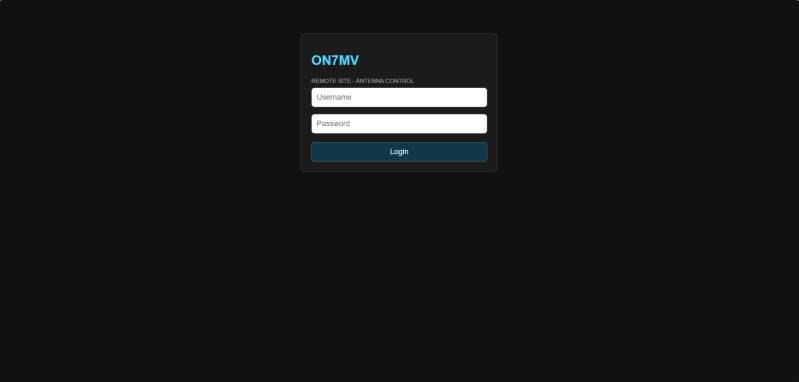
The secure entry point separates owner access from restricted receive-only accounts. Authentication, account status and network restrictions are checked before the control interface becomes available.
Screen 02 — Main Station Cockpit
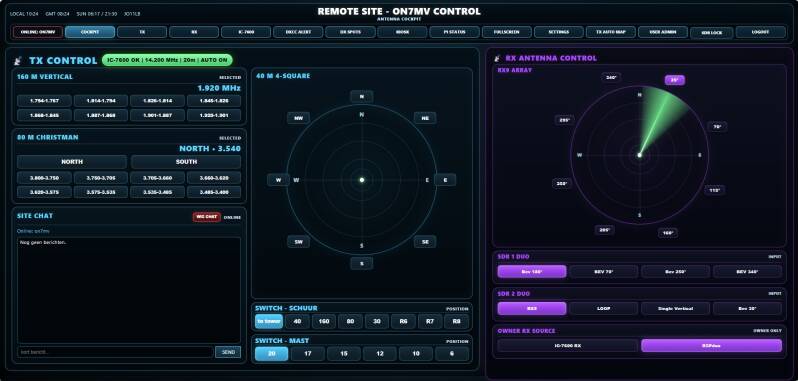
The main cockpit brings transmit routing, receive antennas, live IC-7600 status and site communication together in one operational view. It shows the 160 m and 80 m presets, the 40 m directional array, the main and tower coax switches, the RX9 receive array, both RSPduo inputs and the owner receive-source selector. All connected computers read the same central Raspberry Pi state.
Screen 03 — TX Workspace
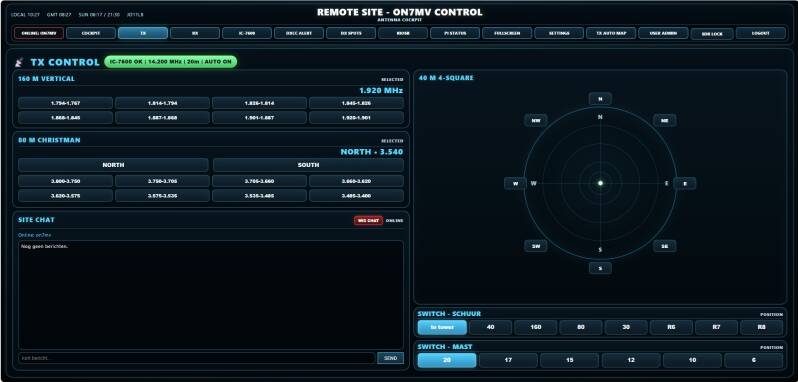
The TX workspace enlarges the complete transmit side without creating a second control system. It uses the same central state and the same protected backend as the main cockpit. Automatic routing follows the live IC-7600 frequency on the released bands, while directional choices such as the 40 m 4-square and the 80 m Christman array remain visible and controllable.
Screen 04 — RX Workspace
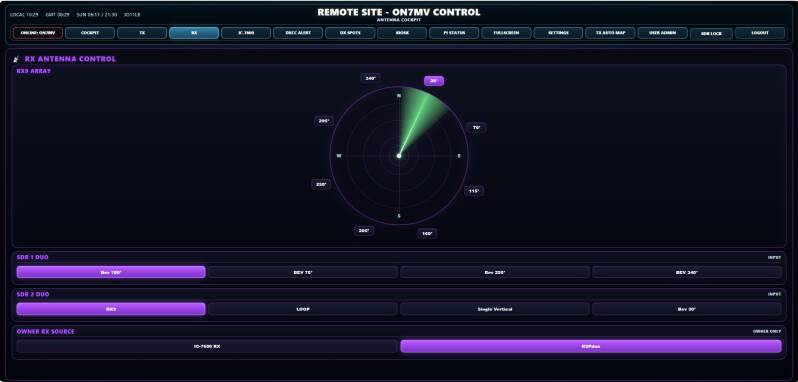
The RX workspace focuses on the station’s receiving system. The eight-direction RX9 compass controls the 9-circle array, while separate selectors feed the two tuners of the SDRplay RSPduo. The owner can also select the receiving source used by the station. Receive-only users can be granted the approved RX functions without access to transmit switching
Screen 05 — IC-7600 Detail Screen
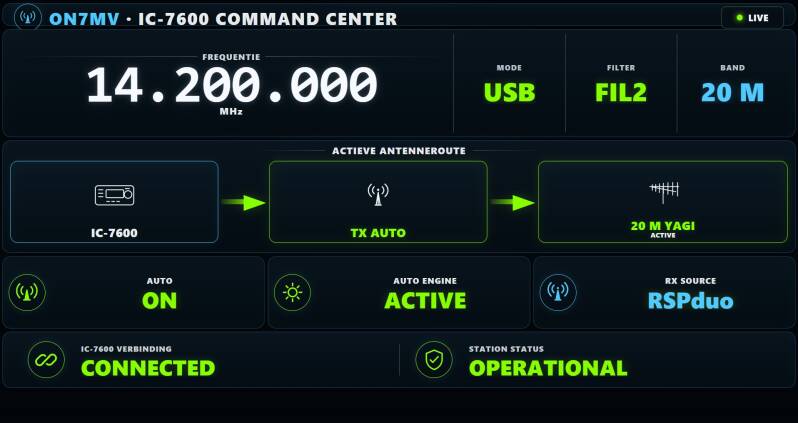
This read-only command-centre screen presents the live IC-7600 frequency, mode, filter and band together with the calculated antenna route. It also shows TX AUTO status, engine health, receive source, radio connection and overall station readiness. The page is designed for fast visual confirmation and does not transmit control commands when opened or refreshed.
Screen 06 — DXCC Alert Screen
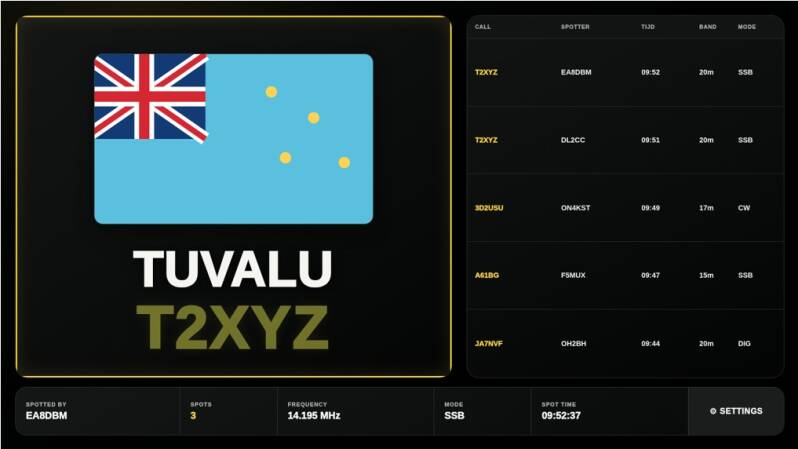
Incoming cluster spots are checked against the uploaded station log per DXCC and per band. A qualifying new entity receives a high-visibility alert with its full name, callsign, flag, spotter, number of spots, frequency, mode and latest spot time. A compact live cluster list remains visible beside the alert. The kiosk gives a new alert four minutes of priority.
Screen 07 — DXCC Settings Screen
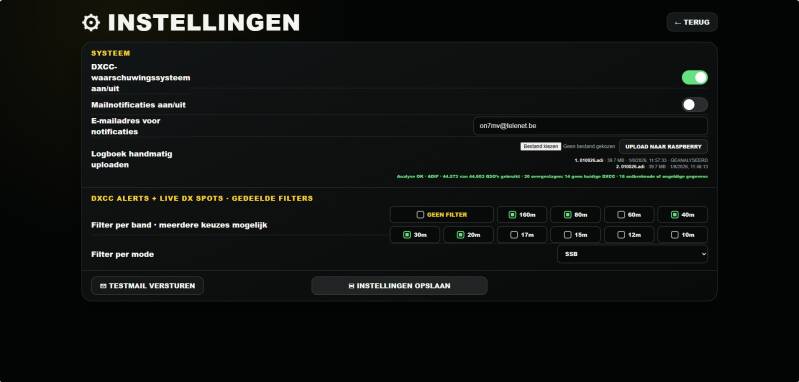
The DXCC settings page controls the alert engine without exposing technical code. It includes system and mail switches, the notification address, test-mail support, manual logbook upload, multiple band selections and CW, SSB or digital-mode filtering. Logbooks are validated and analysed before they become active, and clear error codes are reserved for genuine faults.
Screen 08 — Live DX Spots Screen
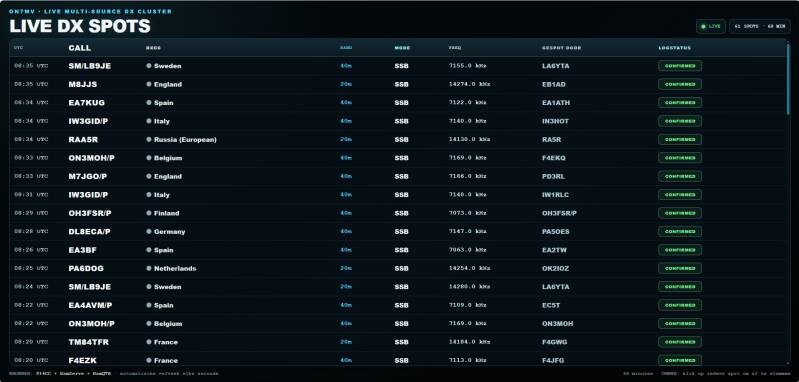
The live multi-source cluster screen keeps at least sixty minutes of filtered spot history and refreshes automatically. New spots appear at the top without forcing the operator away from an older position while scrolling. Callsign, DXCC, band, mode, frequency, spotter and log status are presented in a compact table. The owner can click a spot to tune the IC-7600.
Screen 09 — Grayline Map
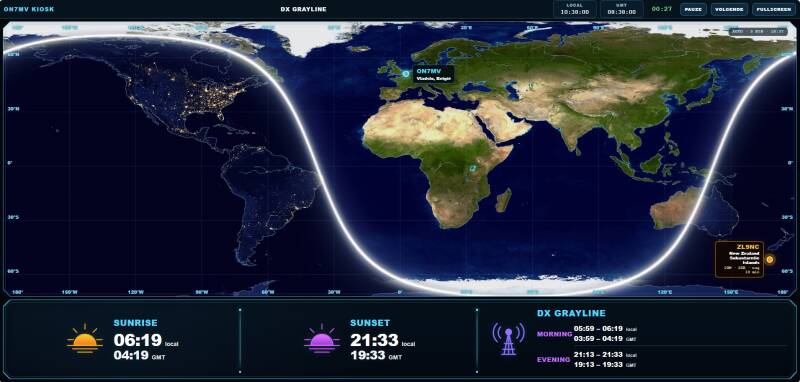
The Grayline screen combines a live day-and-night world map with local and GMT sunrise, sunset and operating windows. ON7MV is marked on the map for quick geographic reference. A newly qualifying DXCC is also marked for four hours, allowing the operator to keep the opportunity in view long after the four-minute alert interruption has ended.
Screen 10 — Propagation Command Center
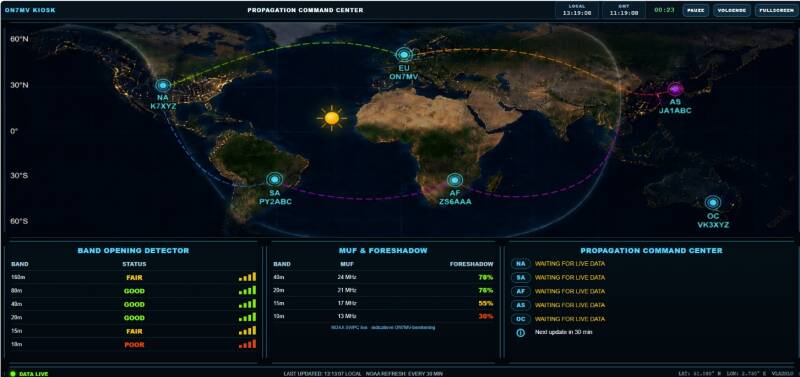
The propagation dashboard summarises current band openings, estimated MUF conditions and short forecast notes. It is intended as an at-a-glance companion to the Grayline map rather than a complex scientific console. The display supports quick decisions about which bands and regions are most promising at the current time.
Screen 11 — RX Signal Route
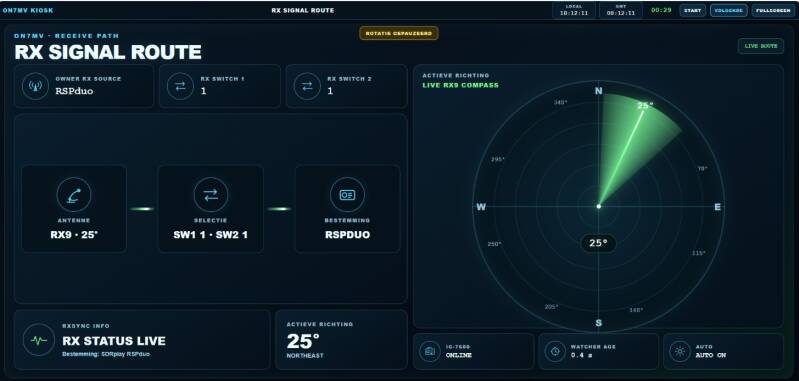
This kiosk screen visualises the active receiving path from source selection through the receive switches to the RX9 direction. The large compass makes the selected sector easy to see on a television, while connection age, radio status and AUTO information confirm that the displayed route is current. It is strictly read-only.
Screen 12 — Raspberry Pi System Status
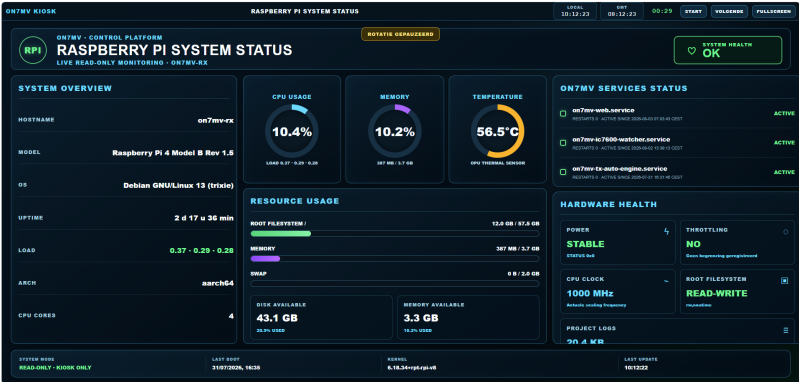
The system-status page monitors the Raspberry Pi that runs the station platform. It displays service health, CPU load and temperature, memory, storage, uptime, power condition, throttling, clock speed, filesystem state and log health. The layout is deliberately large and readable from across the shack, and it never sends radio or relay commands.
Screen 13 — Station Ident
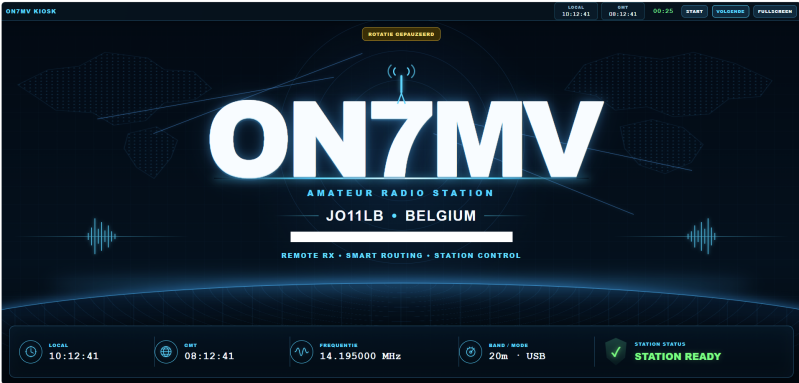
Station Ident is the presentation screen in the kiosk rotation. It gives ON7MV and locator JO11LB a strong visual identity while confirming that the station is ready. Live time and radio information add context without repeating every technical detail from the other dashboards.
Screen 14 — General Settings / Label Editor
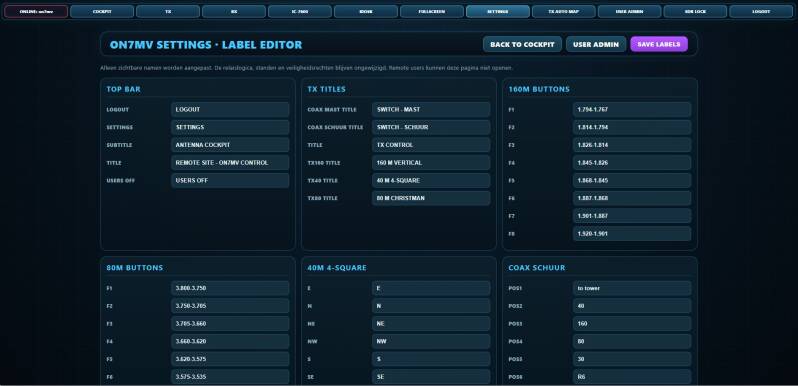
The general settings page allows the owner to change visible interface names and labels so that the cockpit matches the physical station. This layer is deliberately separated from the hardware mapping: changing a label does not change a relay address, antenna route or safety rule.
Screen 15 — User Administration
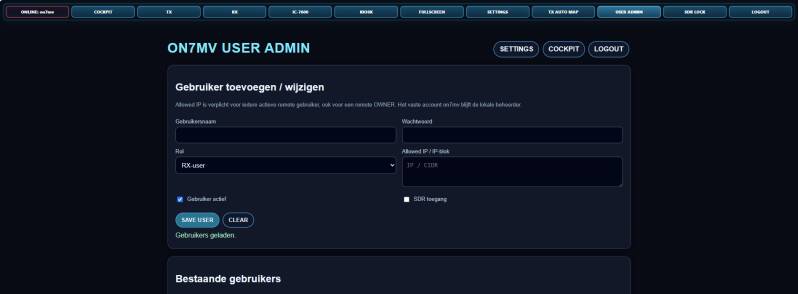
The owner-only user page manages accounts, roles, enabled status, allowed networks and SDR access. Owner and receive-only permissions are kept separate, and prohibited operations are blocked by the server rather than merely hidden in the browser. Passwords are stored as secure hashes and are never displayed in plain text.
Screen 16 — TX AUTO Map
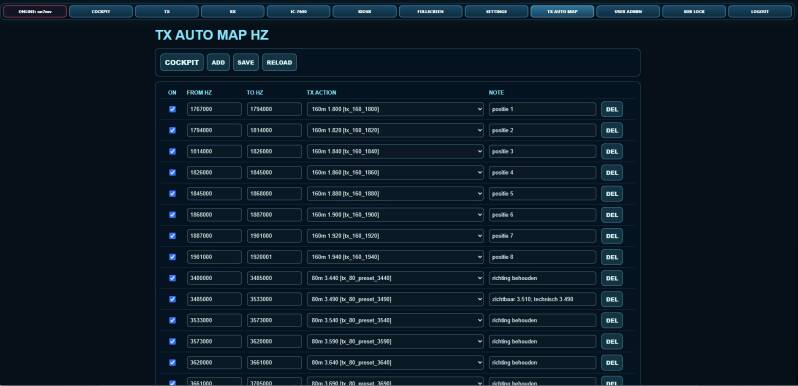
The TX AUTO map defines how verified frequency ranges are translated into antenna routes and relay actions. Released routes cover 160, 80, 40, 30 and 20 metres, while bands without an available antenna remain outside automatic control. The map supports safe one-route-at-a-time switching and is restricted to the owner.
Advanced Receive System and RSPduo Integration
The ON7MV remote station includes a dedicated receive system built around two remotely controlled RX antenna switches, an SDRplay RSPduo and the Icom IC-7600. The purpose of this system is to give the operator full control over the receive antennas while keeping the operation clear, safe and repeatable.
Each RX switch can select one of several receiving antennas. The selected antenna can be routed to the RSPduo or, when required, to the separate receive input of the IC-7600. All switching is controlled through the ON7MV cockpit and the current status is shared between connected users. This means that every operator sees the same antenna selection and the same active receive source.
A major reason for building this system was to reduce operating mistakes. During contests or DX operation, several antennas, receivers and signal paths may be available at the same time. Manual switching can easily lead to a wrong antenna selection, an incorrect signal route or confusion between operators. The central Raspberry Pi control system makes the selection process more predictable and prevents different users from unknowingly working with conflicting settings.
Safety was an important part of the design. The RX paths use controlled relay switching, with only one input selected at a time. When changing antennas, the system first disconnects the existing selection before activating the next one. Additional safety relays protect the sensitive receive equipment when the station transmits. This is especially important in a high-power amateur radio station, where the RSPduo and the receive antenna system must be isolated from transmitted RF.
What is the RSPduo?
The SDRplay RSPduo is a software-defined radio receiver with two independent tuners. Unlike a traditional receiver, much of its operation is performed through software. It can display a wide part of the radio spectrum, show multiple signals at the same time and provide detailed control over filters, modes, audio and signal analysis.
At ON7MV, the RSPduo is connected to the Raspberry Pi and is operated through SDRconnect. The receive antennas themselves are selected through the ON7MV cockpit, while SDRconnect is used for the spectrum display, tuning, demodulation and audio processing.
The RSPduo can be used as a normal single-tuner receiver, but one of its most important features is diversity reception.
Diversity Reception
Diversity reception uses both RSPduo tuners at the same time. Each tuner receives the same frequency, but from a different antenna or receive path. The two signals can then be combined in software.
Because noise, interference and fading are not always identical on both antennas, the signals can be adjusted in phase and amplitude. This can reduce an unwanted signal or local noise while improving the wanted DX station. In other situations, diversity can reduce fading and make a weak signal more stable and easier to understand.
The best results are obtained when the two receive antennas hear the signal differently. For example, one antenna may receive the wanted station more clearly, while another receives less interference. Diversity reception uses the difference between both signals to improve the final result.
Practical Advantages
The complete RX system offers several important advantages:
-
remote selection of multiple receiving antennas;
-
direct control of both RSPduo tuners;
-
a shared and clearly visible station status;
-
safer switching during high-power operation;
-
reduced risk of operator mistakes;
-
improved weak-signal reception;
-
better suppression of interference and local noise;
-
diversity reception for difficult DX and contest signals.
The RX system is fully integrated into the wider ON7MV remote station. The cockpit screens show the selected RX antennas, the RX9 direction, the RSPduo tuner selections and the active receive source. The individual control screens can be seen on the Remote Station 2026 page of this website.
This project is not only intended to make remote operation possible. Its main purpose is to make a complex station easier, safer and more consistent to operate, both for the station owner and for visiting contest operators.
Create Your Own Website With JouwWeb